![AI [re]Generation](https://substackcdn.com/image/fetch/$s_!L6aZ!,w_120,h_120,c_fill,f_webp,q_auto:good,fl_progressive:steep/https%3A%2F%2Fsubstack-post-media.s3.amazonaws.com%2Fpublic%2Fimages%2Fd316565c-2791-4f13-a334-efcf2499510d_768x768.png)
[Working with Claude] - Part 1: The Stack
Your mental map of the Claude ecosystem, and how to choose the right tool for each task.
Lately, the same questions keep coming back in our conversations: which Claude tools do you use every day? Which model should we pick? Is Cowork worth it?
I’m Ulysse, CTO at ElevAI. We build AI automations and agents for organizations, and we train the teams who run them. Here on [re]Build, I write about how we use these tools for real projects: the ones we've adopted, the workflows we've built around them, and what we've learned in the process.
And I get why it keeps coming up: Anthropic has been shipping at a pace that’s hard to follow even when it’s part of your job to do so. New models, new apps, new features, sometimes all three in the same week. A chart that circulated widely this spring captures it better than I could: everything the Claude team shipped in 52 days, on one calendar. Even when keeping an eye on it, it's easy to miss half of them.
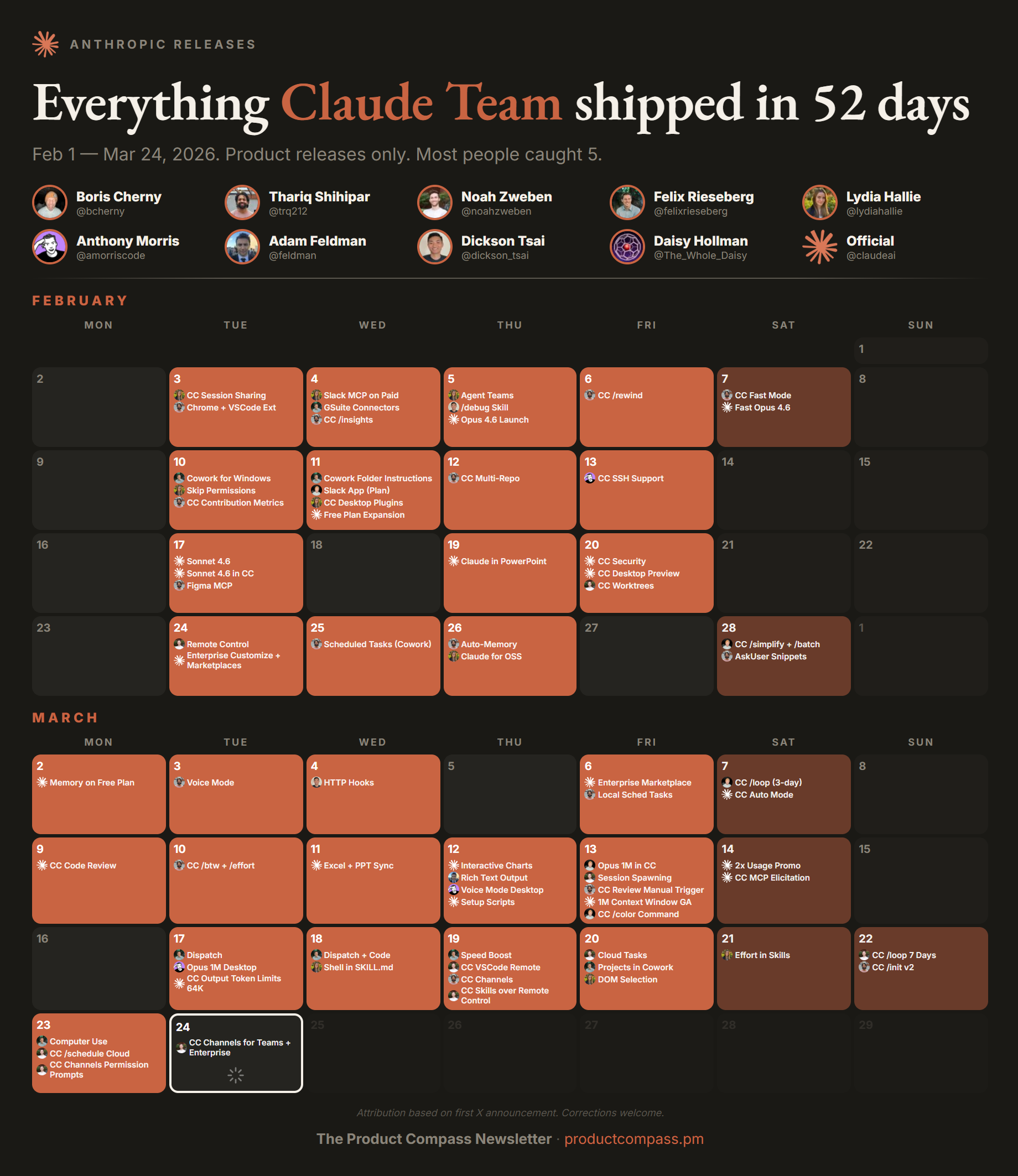
Rather than repeating myself in every call, I decided to take some time and write down the answers properly, in a form I can share with anyone who asks. Welcome to Working with Claude.
If you’re just getting started, considering a switch from another model, or already using Claude daily and wondering what you’re missing, this is for you. We will start with the foundations, and go deeper with each subsequent part: choosing plans and models, setting up the app properly, delegating to Cowork, Claude Code, automation, and more advanced topics as we go. Every part will be written to stand on its own, so you can jump straight to whatever you need.
A quick note on how this series is built. Everything comes from primary sources (official docs, or Anthropic employees building Claude, linked as we go) and from our own daily use. And because things move fast, I’ll date what could go stale, and correct what changes with notes.
Today’s first part sets the lay of the land: a clear picture of what exists, what each tool is for, and a simple way to decide which one to open for the task at hand.
Start with where you work
Claude, today, can be found in several places where you can work rather than in a single product. I’ll call them surfaces throughout the series. Choosing the right one matters more than choosing the right model (models come right after), and there are three primary surfaces to understand first, plus a growing set of extensions.
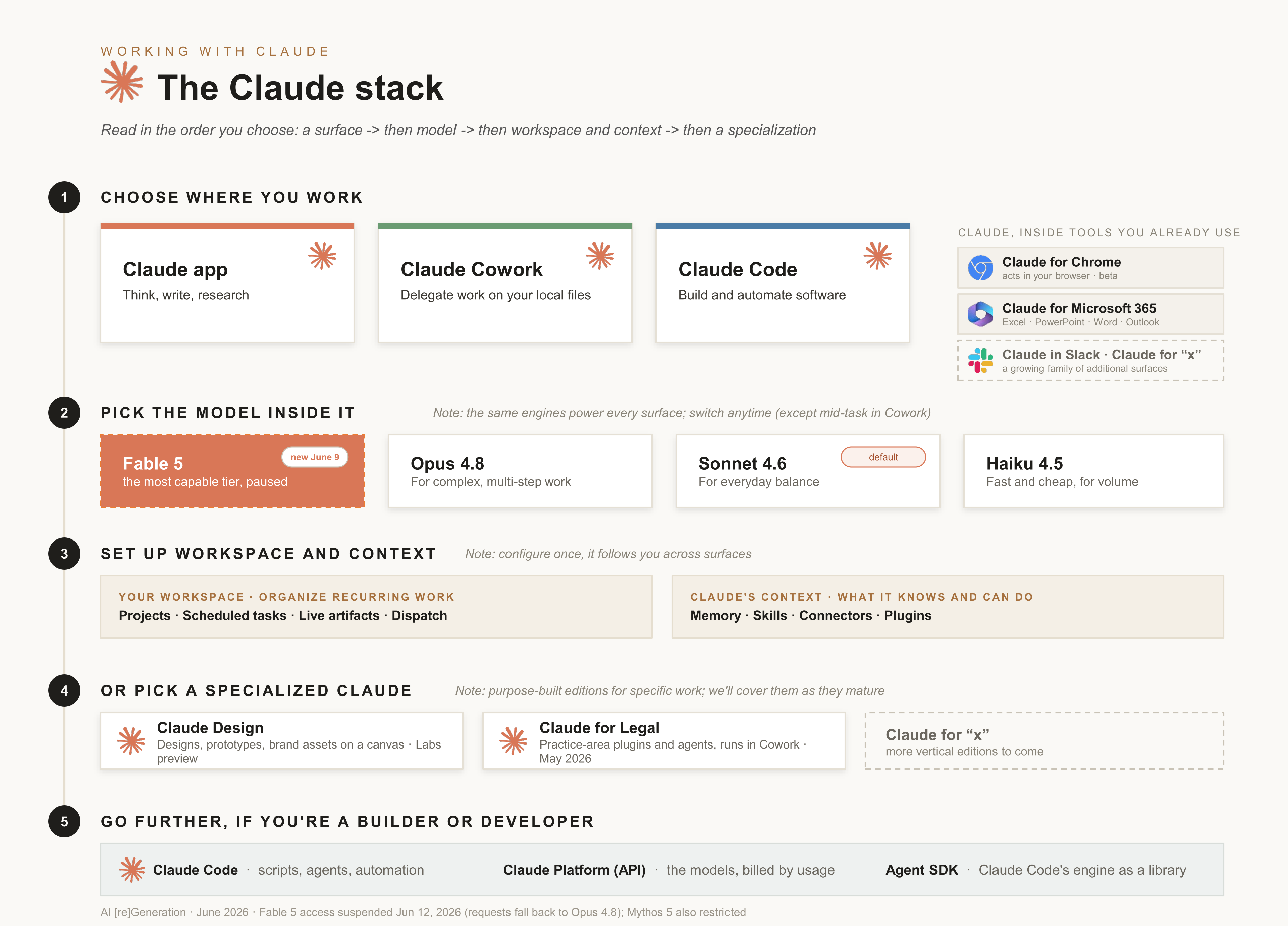
The Claude app (web, desktop, mobile) is the one we all know well: you ask a question, Claude answers. Most of my thinking work happens there: pressure-testing an idea before a meeting, turning a 40-page PDF into one page of decisions, drafting the email I’ve been postponing. If you’re starting from zero, the free Claude 101 course on Anthropic Academy is the quickest proper introduction.
It’s also where you configure most of what the rest of this series will cover, which is why even experienced users of the other surfaces still use it.
Claude Cowork is the newest, and the one non-developers get most excited about when they see it in action. It lives on your computer (macOS and Windows). You connect it to a folder, describe a goal, and it does the work: “turn this pile of PDFs into an Excel comparison table”, “clean up this export”, “draft a monthly PowerPoint report from these notes”, etc.
More than a new app, it’s a new way of working with Claude: delegation. You describe an outcome, Claude works through the steps on its own in a dedicated workspace, and asks before deleting anything or taking risky actions. The official getting-started guide is short, kept up to date, and well worth giving a read.
Claude Code is the developer surface: an agent that lives in a codebase and builds, fixes, and automates software. It started as a command line interface (CLI) tool, but it is now included in the iOS and Android apps, in the Claude web and desktop apps, and also comes as an IDE integration. It’s the “deepest” of the three surfaces, and the clearest preview of where this agentic AI trend is going: Boris Cherny, its creator, wrote in January 2026 that practically all of his code is now written by Claude Code, at twenty-plus pull requests a day. When you’re ready to go hands-on, his team’s best practices guide is the absolute reference.
Each of these three will get its own dedicated part later in this series, so consider today’s tour the 30,000-foot view.
For day-to-day routing between those surfaces, Cat Wu, Claude Code’s Head of Product at Anthropic, frames it well. She wrote in March 2026 about how she spreads her own work across the three surfaces. Her split is easy to remember: the Claude app to think, Claude Code to build, Claude Cowork for everything else.
Then there are the extensions: Claude showing up inside the tools you already use day to day. Claude for Chrome (beta) acts directly in your browser, filling forms and researching across tabs. Claude for Microsoft 365 works inside Excel, PowerPoint, Word and Outlook. There’s Claude in Slack too, and new ones keep coming, so take these as examples; the list will grow. None of them needs a separate slot in your mental map: when Claude appears inside a tool you already use, you’ll know what you’re looking at.
The models underneath
Whatever surface you pick, the same suite of models do the work, so it’s worth knowing the cast. As of June 2026, there are four main models you’ll come across.
Sonnet 4.6 is the default for most people (it’s what Free and Pro accounts currently start on and Anthropic’s recommended default), and the best everyday balance of speed and intelligence. Opus 4.8 is the step up for complex, multi-step work. Haiku 4.5 is the smallest and fastest: when the task is simple and volume matters, it’s the one to choose.
And then there’s Fable 5, which gets its own paragraph because it arrived two days ago. Released on June 9, it’s the most capable model Anthropic has shipped, the first of a new tier sitting above Opus, built for the hardest and longest-running work. It’s included in all paid plans until June 22, 2026 (it does consume your usage allowance faster than the other models), and will move to pay-per-use credits after that. If you’ve been saving a hard problem, these few weeks are the time to throw it at Fable.
One more name you have probably come across is Mythos 5: it is the same base model as Fable 5, minus certain safeguards (on cybersecurity and biology), and is reserved for vetted organizations only.
Update, June 12: Anthropic has since paused public access to Fable 5 and Mythos 5, following a US government export-control directive. Until that is (hopefully) lifted, Opus 4.8 is the most capable model you can use for now.
As for choosing between them: in the Claude app and Claude Code, it matters less than it looks, because you can change models anytime from the picker, even mid-conversation. Cowork is the exception: the model you pick when you start a task stays the same throughout the whole conversation, so choose it adequately beforehand. Either way, start with the default, and step up to Opus when a task requires it. And before switching models at all, look at the effort setting: Anthropic’s own guidance is that adjusting effort often does more than changing models.
Plans, prices, usage limits, effort, thinking modes: the settings that determine what you get and what you spend are exactly what Part 2 of this series will be about.
Your workspace, and Claude’s context
Surfaces are where you work; models do the answering. The Claude app also acts as the control center for one more layer that’s worth understanding properly, because most of it carries over across multiple surfaces. I find it easiest to think of it as two groups: your workspace, and Claude’s context.
Your workspace is what you see in the app’s sidebar, the features that organize recurring work. Projects group related conversations with shared files and custom instructions, so every chat inside the project starts already informed. Scheduled tasks enable you to run tasks on a timer: a Monday digest, a daily check, etc. Live artifacts are interactive pages Claude builds for you that keep their data fresh. Dispatch (beta) lets you hand tasks to Claude from your phone and have them run on your computer.
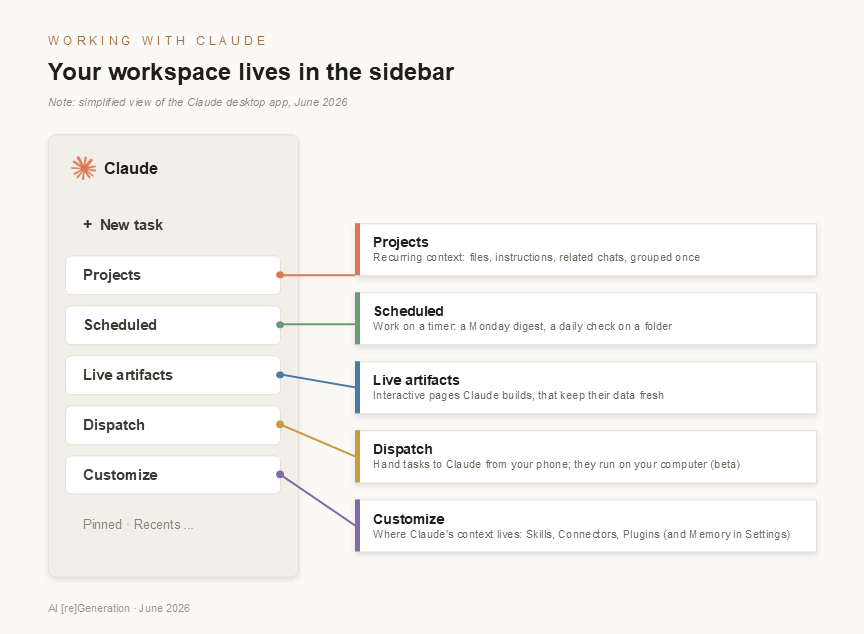
Claude’s context is everything that shapes what Claude knows and can do when working for you. Memory is what it retains about you and your work between conversations (you can read it, edit it, and you should do both occasionally). Skills are procedures you teach once and can reuse anytime: a reporting format, a review checklist, your writing rules. Connectors give Claude access to the tools where your data lives (Gmail, Google Drive, project trackers, etc.), with the same permissions you already have as a user. Plugins package skills and connectors together, so a whole setup can be installed in one step.
I won’t pretend these lists are exhaustive, and parts of them will evolve in the coming months. But there's one habit worth building from day one: the third time you catch yourself re-explaining the same context, or walking Claude through the same procedure again, stop and move it into this layer. Set it up once, and you can propagate it to every surface.
Choosing in practice
Faced with an actual task, here are the questions I typically run through. Nothing “official”, just what works for us day to day at ElevAI, and I’ll keep refining such decision trees as we go.
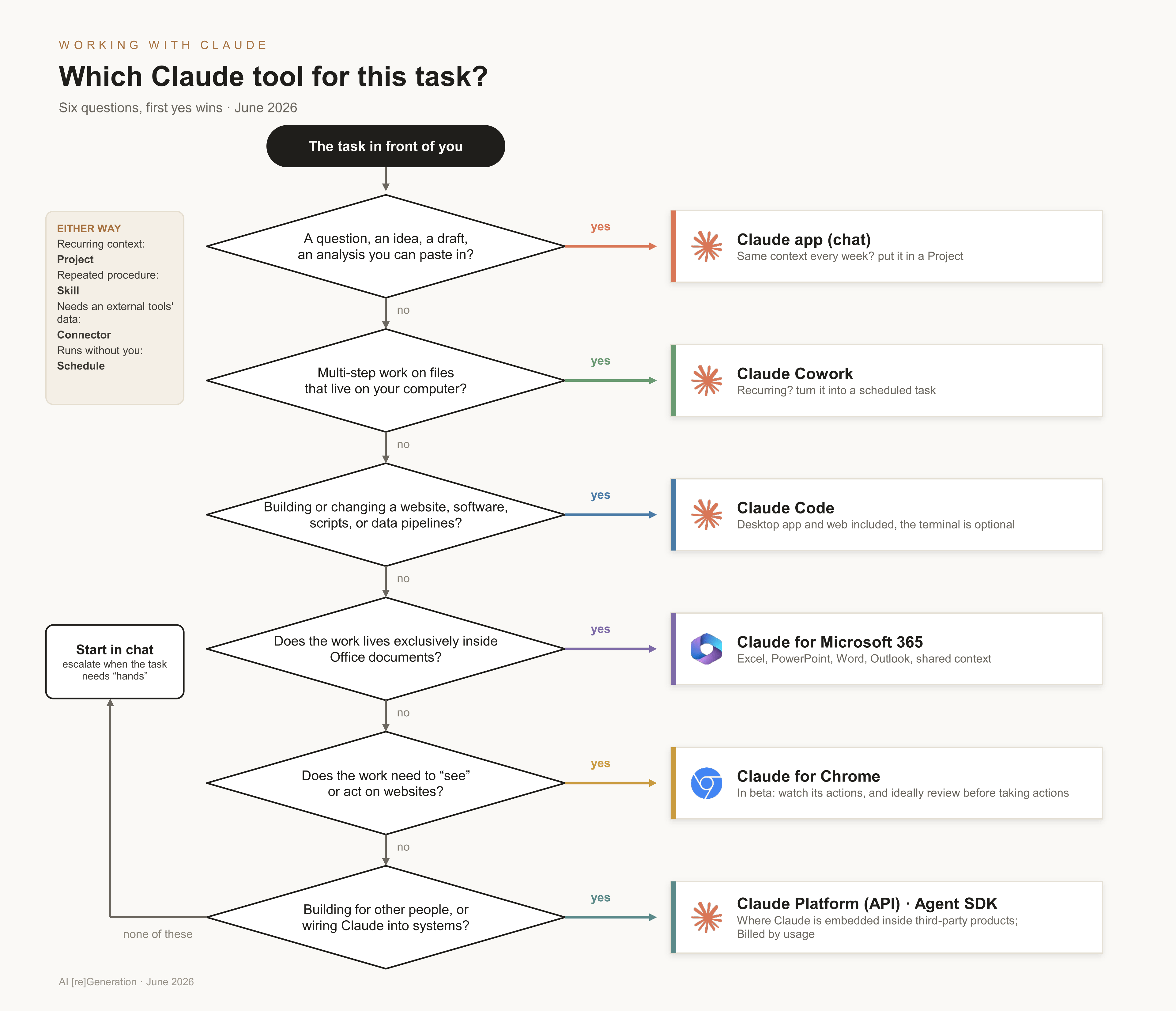
Let’s say you’re putting together a market study. The early thinking happens in the app: a Project holding your notes and sources, conversations to pressure-test the angle. Then comes the repetitive part, pulling and structuring data on a few hundred companies, and that’s a script Claude Code can build and run for you. The monthly update that turns the results folder into a clean deliverable can be either Claude Code or Cowork (ideal for scheduled jobs).
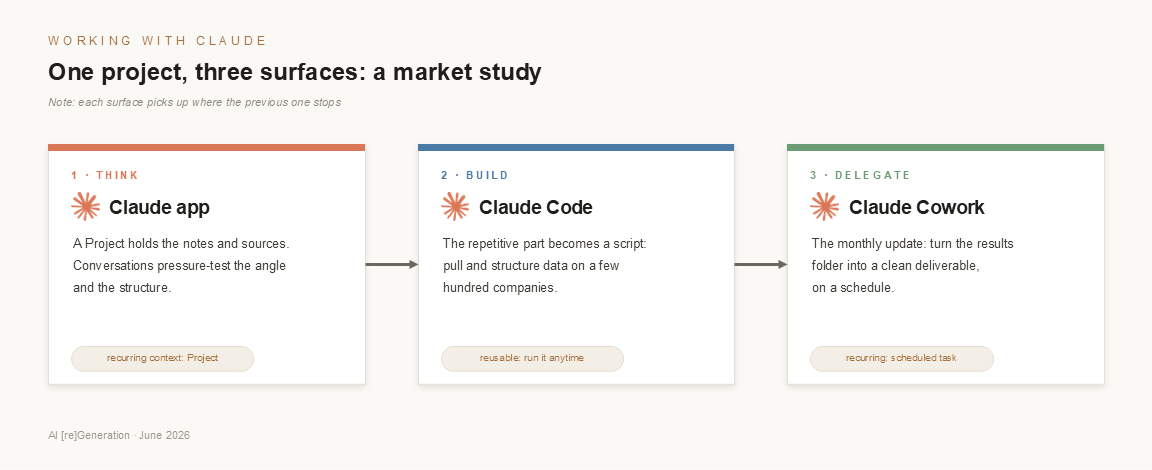
One project, three surfaces. One thing to know is that the context from one surface is not automatically available to another surface, but you can carry it across with a short hand-off. When I want to move from one surface to another, I use in the conversation holding the context a prompt like this:
Before I move this work to another tool, please craft a self-contained handoff brief so a fresh session can continue without me re-explaining everything.
Use these headings to structure the brief:
Objective (what we’re ultimately trying to produce);
Context (the essential background and any constraints);
Decisions made so far (what we’ve settled with timestamps, and why);
Current state (what’s done, and what’s in progress);
Open questions (what still needs a decision or input from me);
Files and sources (what to reference, by name);
Next step (the most useful actions to take next).
Keep it concise and factual, prefer guidance/suggestion instead of rigid rules or instructions to avoid overindexing or overly biasing the brief. Write it so I can paste it directly into a new conversation.
Paste the answer into the next surface to start where the conversation left off.
If there’s one mistake I see everywhere, it’s staying in the chat for everything, because the chat is where everyone starts. If you’re re-uploading the same files every Monday and walking Claude through the same steps again, that task outgrew the conversation a while ago. It wants to be a Project, a skill, or a Cowork scheduled task.
What’s next
Part 2 of this series will answer the questions I get asked most: which plan is actually worth paying for, how the models compare on real tasks, and how to get the most out of the settings that matter (model, effort, thinking modes, and the rest), with concrete examples throughout. And given how fast things change (Fable 5 was suspended barely three days after launch), knowing how to pick and switch models, without over-relying on any one, matters more than ever.
Until then, here’s a small exercise: take one recurring task from your week and run it through the decision tree above. If the answer points to a surface you’ve never tried, you know where to start.
One last thing: following are the few official pages I keep going back to when in doubt; worth bookmarking in case you need to go back to the source.
• The release notes, the quickest way to see what shipped while you weren’t looking
• Anthropic Academy: free short courses, with certificates (Claude 101 to start, and there’s a Cowork intro too)
• Cowork’s getting-started guide
• Claude Code’s best practices
Facts and links checked on June 12, 2026. If something important changes, I’ll update this article with a note.