![AI [re]Generation](https://substackcdn.com/image/fetch/$s_!L6aZ!,w_120,h_120,c_fill,f_webp,q_auto:good,fl_progressive:steep/https%3A%2F%2Fsubstack-post-media.s3.amazonaws.com%2Fpublic%2Fimages%2Fd316565c-2791-4f13-a334-efcf2499510d_768x768.png)
Your OpenClaw Needs a Shell
NVIDIA built a security layer for OpenClaw called NemoClaw. Here's what we found when we tested it.

When we talk to clients and peers about OpenClaw, we can feel a genuine interest.
An AI agent that runs on your own machine, communicates through your existing messaging apps, and works around the clock: the concept makes sense to a lot of people. But the conversation always lands on the same question: is it safe enough to use for real work?
For now, the honest answer is: not yet.
We’ve written about the security gaps in previous articles, and we’ve built our own layers of protection (user isolation, network lockdown, behavioral rules). But those are guardrails we assembled ourselves, on top of a platform where prompt injection is still an open problem and vulnerable instances have been found by the thousands.
We’re already seeing what AI-related security failures look like at scale. Earlier this year, Amazon suffered major outages caused by AI tools, and an autonomous AI agent hacked McKinsey’s internal chatbot in two hours, accessing millions of records. As AI agents get more capable and more connected to real systems, the security surface grows with them.
This is what NemoClaw is trying to solve.
A security layer for OpenClaw
NemoClaw is an open-source project released by NVIDIA on March 16, 2026. In their words: “an open source reference stack that simplifies running OpenClaw always-on assistants more safely.”
In practice, it’s a security layer that wraps around OpenClaw.
Your agent still runs OpenClaw with all its capabilities (messaging, tools, skills, memory), but inside an NVIDIA OpenShell sandbox: an isolated environment where you control exactly what the agent is and isn’t allowed to do.
By the way, NVIDIA called their sandboxing engine OpenShell (in computing, a shell is the layer that sits between you and the system and controls what gets through). For a platform whose mascot is a lobster, it couldn’t be more fitting. 🦞
NemoClaw’s architecture has three layers, each addressing a different type of risk.
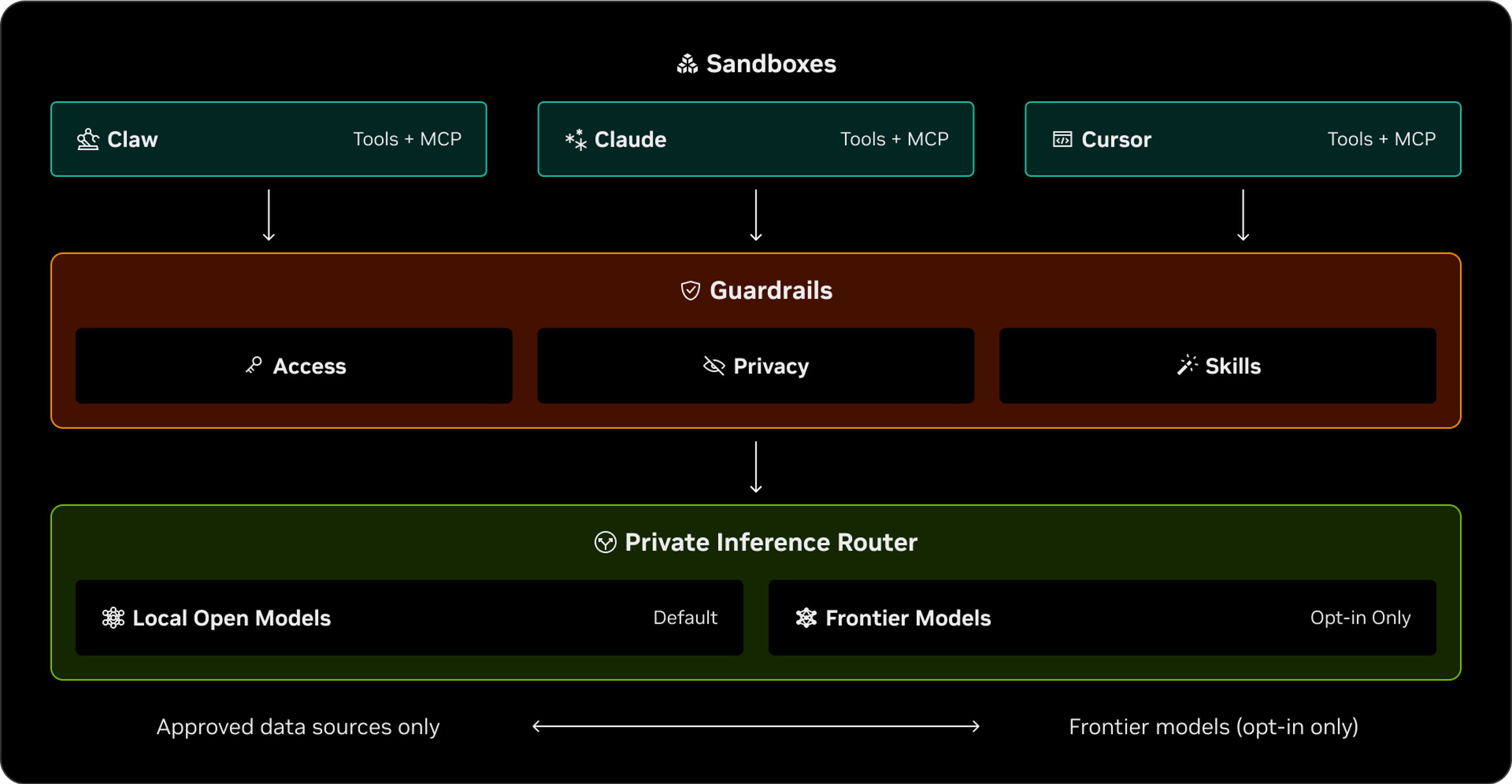
Sandboxes are the foundation. Each agent runs in its own isolated container with a separate filesystem and network. This isolation is enforced by the operating system itself, not by a policy that the agent could circumvent through clever prompting. The agent literally cannot access files or networks outside its container.
The private inference router handles how the agent communicates with its language model (the AI that generates its responses). Your API keys never enter the sandbox. They stay on the host machine, and the gateway routes requests through a secure proxy. Even if the sandbox is compromised, your credentials stay protected.
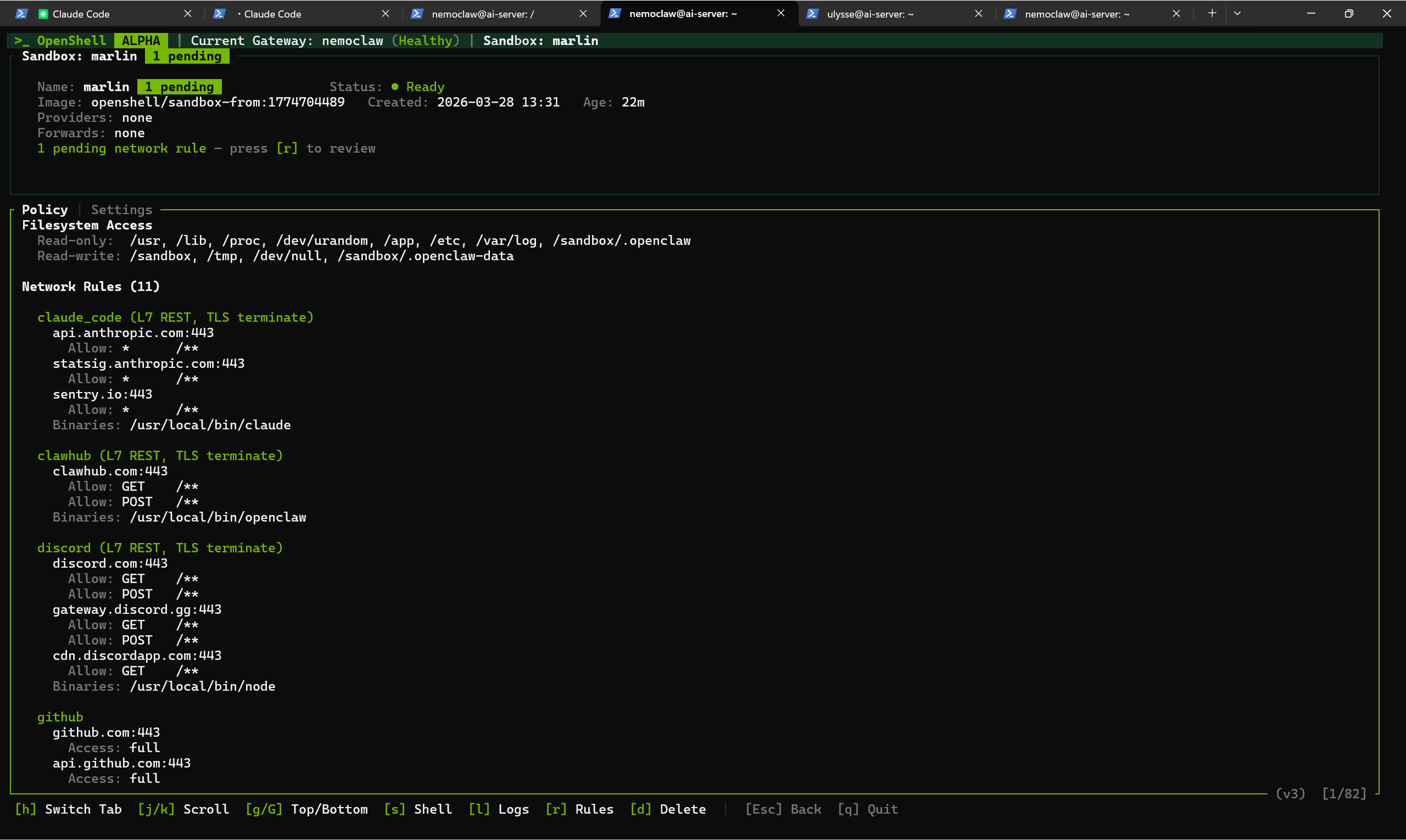
Finally, Guardrails control what the agent is allowed to reach. The most important concept here is default-deny networking: the agent starts with zero access to the outside world. Every service it needs to connect to (Discord, GitHub, Telegram, a client’s API) has to be explicitly listed in a policy. Anything not on the list is blocked and logged. You can review blocked requests in a live dashboard and decide whether to approve them.
NemoClaw supports multiple model providers: NVIDIA’s own Nemotron models, OpenAI, Anthropic, Google Gemini, and any compatible endpoint, or even use a local model running on your own machine.
One limitation worth noting: NemoClaw currently works with API keys only, not with the subscription-based OAuth login that OpenClaw supports for ChatGPT. In practice, this means API usage is billed per token, which can add up with always-on agents, whereas subscriptions like OpenAI Codex offer a flat monthly rate. For now, our options are a cloud API key or a local model.
Testing the alpha release
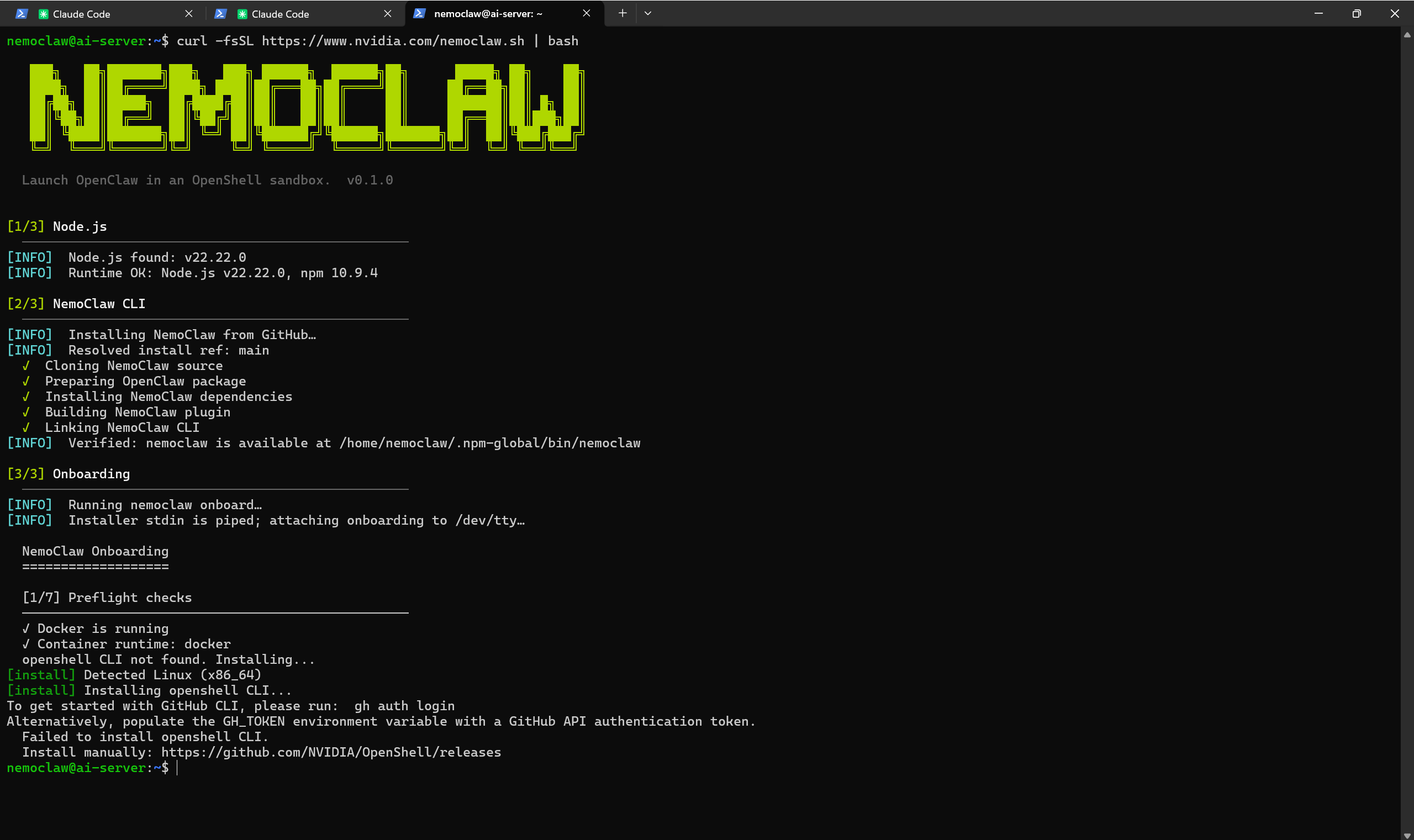
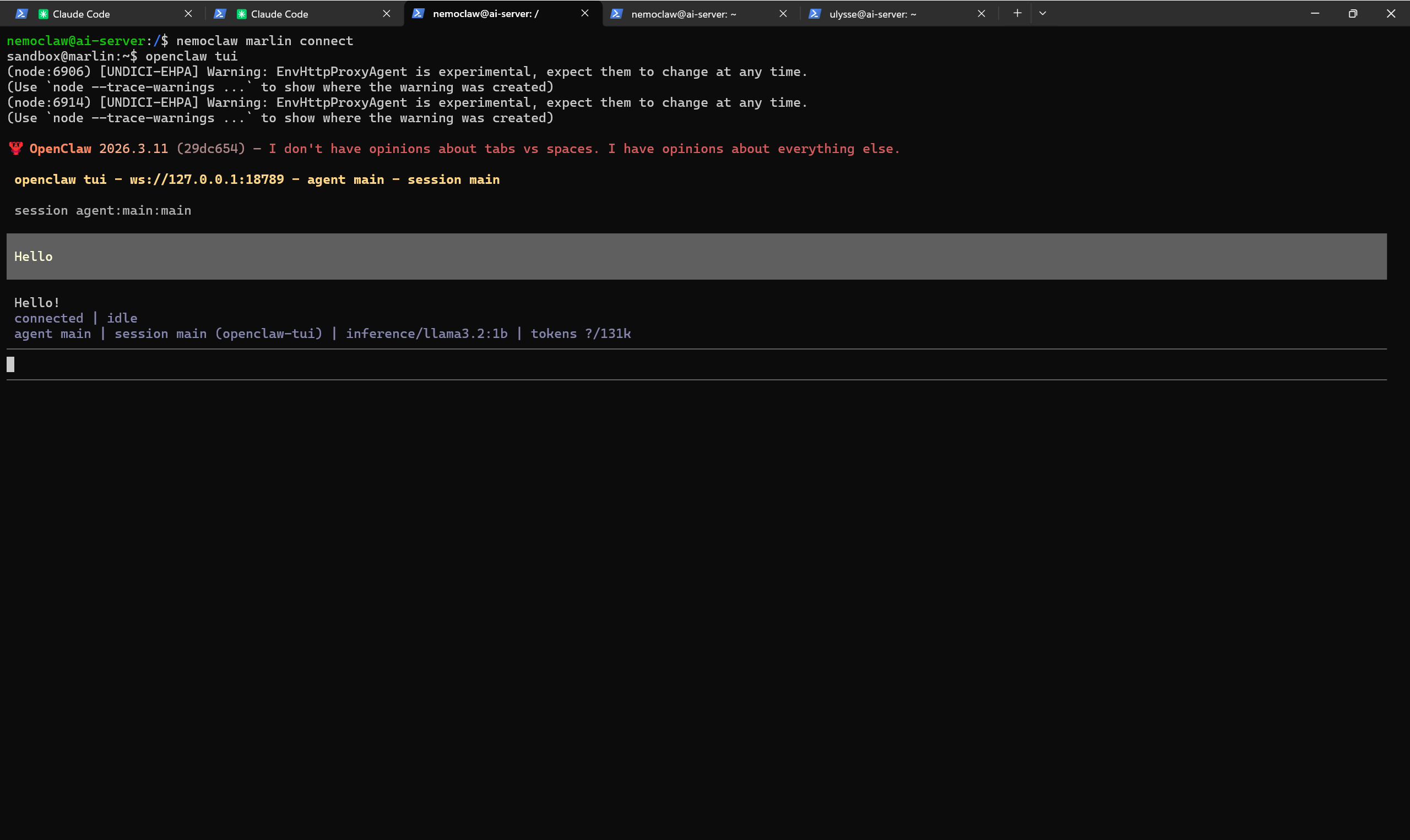
We installed NemoClaw on the same mini PC that already runs our OpenClaw agents. The official installer is a single command, but in practice the setup requires some extra configuration: port conflicts to resolve, network routing to adjust, a few things the one-line installer doesn’t handle for you. It’s not plug-and-play yet, but that’s consistent with what you’d expect from an alpha version.
What’s interesting is what you end up with. The agent running inside the NemoClaw sandbox is a full OpenClaw instance: same workspace files, same skills, same channel integrations. The difference is the layer of control around it: you can see, in the policy dashboard, every endpoint the agent is allowed to reach, and every request it makes. If it tries to connect to a service you haven’t approved, the request is caught and you can decide what to do with it.
Instead of paying for a cloud API, we tested running the AI model locally on our server using Ollama. We picked Llama 3.2 1B, one of the smallest models available, to see if NemoClaw could work on modest hardware with no GPU.
It does: responses come through, but CPU inference is noticeably slow. For actual agent work, you’d want a larger model (7B or above) and ideally a machine with a good GPU.
But the fact that it runs entirely on our hardware, with no external dependency, is an important option for anyone who cares about data sovereignty.
This is still alpha software, and NVIDIA is upfront about it: “not production-ready, interfaces may change without notice.” But even at this stage, we’re genuinely interested in what the next releases will bring. NemoClaw could be the piece that makes OpenClaw viable for business use, where the technology is appealing but the risk profile has been too high to embed in any sensitive process until now.
How to set it up
The fastest path is the Hostinger NemoClaw VPS template, which pre-installs NemoClaw on a clean Ubuntu server. You can pick a VPS plan (KVM2 at $6.99/month is enough), select the template, and run the onboarding wizard from the terminal. Note: We’ll publish a dedicated walkthrough of the VPS setup in a coming article.
For a manual install on your own hardware, you can hand this prompt to Claude Code and let it prepare the server for you:
I would like to install NemoClaw on this server to run a sandboxed OpenClaw agent. Walk me through: (1) creating a dedicated Linux user for NemoClaw with proper permissions and Docker access, (2) checking for port conflicts on ports 8080 and 18789 and resolving them if needed, (3) installing NemoClaw via the official installer (curl -fsSL https://www.nvidia.com/nemoclaw.sh | bash), (4) resolving any issues during installation (the OpenShell CLI may fail to install automatically). Once the installation is complete, tell me to run nemoclaw onboard so I can configure the sandbox interactively.
The bigger picture
Security for AI agents has been treated as an afterthought for most of the past year. NemoClaw is one of the first serious efforts to change that, and the fact that it comes from NVIDIA, with operating-system-level isolation rather than basic prompting techniques, confirms what we’ve been seeing with our own clients: the demand for agents is there, but without genuine security controls, adoption will stall.
We’ll keep running NemoClaw alongside our existing agents. We’re already thinking about whether to move some of our client-facing agents into NemoClaw sandboxes, but we’re waiting for the project to mature past alpha before making that call. When it does, onboarding a new agent might soon start with giving it a shell.