![AI [re]Generation](https://substackcdn.com/image/fetch/$s_!L6aZ!,w_120,h_120,c_fill,f_webp,q_auto:good,fl_progressive:steep/https%3A%2F%2Fsubstack-post-media.s3.amazonaws.com%2Fpublic%2Fimages%2Fd316565c-2791-4f13-a334-efcf2499510d_768x768.png)
[Working with Claude] - Part 2: Models, Plans & Pricing
Which model for which task, what plan is worth paying for, and how the Fable 5 saga changes everything.

Welcome back!
Part 1 of this series mapped the Claude ecosystem: the surfaces where you work, the models underneath, and how to pick the right tool for each task.
With that map in hand, this second guide tackles the questions I get asked most often, and the past three weeks have made them more pressing than ever: which model for which task, which plan is worth paying for, and what it all costs.
If you followed one AI story in June, it was probably Fable 5.
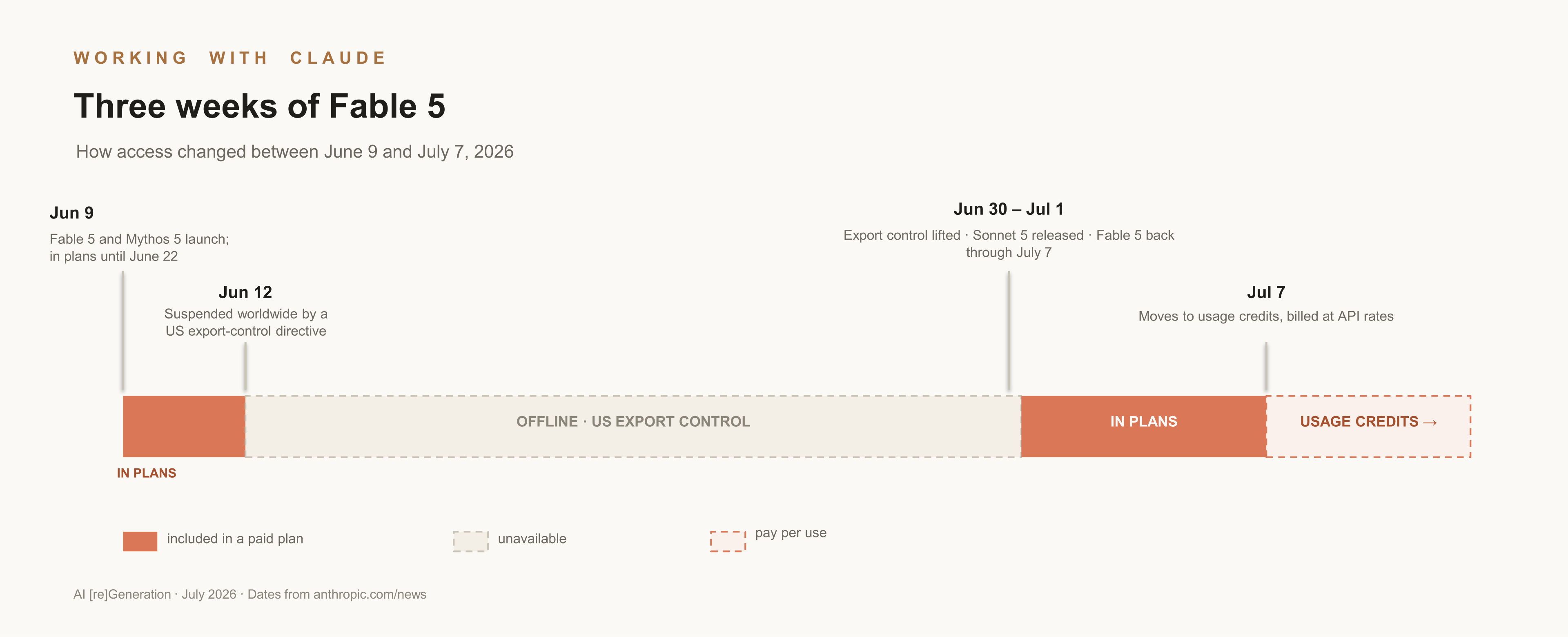
Anthropic released its most capable model on June 9; three days later, a US export-control directive forced it offline worldwide; on July 1, it came back. But… on July 7, it won’t be included in the subscription plans anymore: from that date, using the strongest model will require paying for it separately, through usage credits or the API.
That last detail may matter more than the whole drama surrounding Fable.
Up to now, AI subscriptions have been heavily subsidized (the research firm SemiAnalysis estimated that a fully used $200 Max plan delivers on the order of $8,000 a month in API-equivalent usage 🤯), and with Fable 5 we may be entering a period where frontier AI is sold at something closer to its real cost.
That will come as a hard landing for many of us: the impression that agentic AI is cheap was largely a product of those subsidies. If the period ahead confirms it, knowing which model to use for which task stops being a nice-to-have.
So that’s what this article covers: what exactly changed with the release of Fable 5, how to split work across the models (whether you’re on a paid plan or the free one), and what all of it means when choosing a plan. At the end, we also show you our own playbook: how we run models, surfaces, and budgets at ElevAI day to day.
The new rules of access
Fable 5’s inclusion in the plans was temporary from the start. The launch announcement said it would be part of paid plans only until June 22, with Anthropic citing limited compute capacity, and would then move to pay-per-use credits.
The export-control episode interrupted that window, and the restored terms are even stricter than the original ones: included in paid plans through July 7, up to half of your weekly usage, then available through usage credits.
Understandably, some users are disappointed: between the suspension and the new terms, the included window ended up much shorter than first announced, with less usage and tighter safeguards.
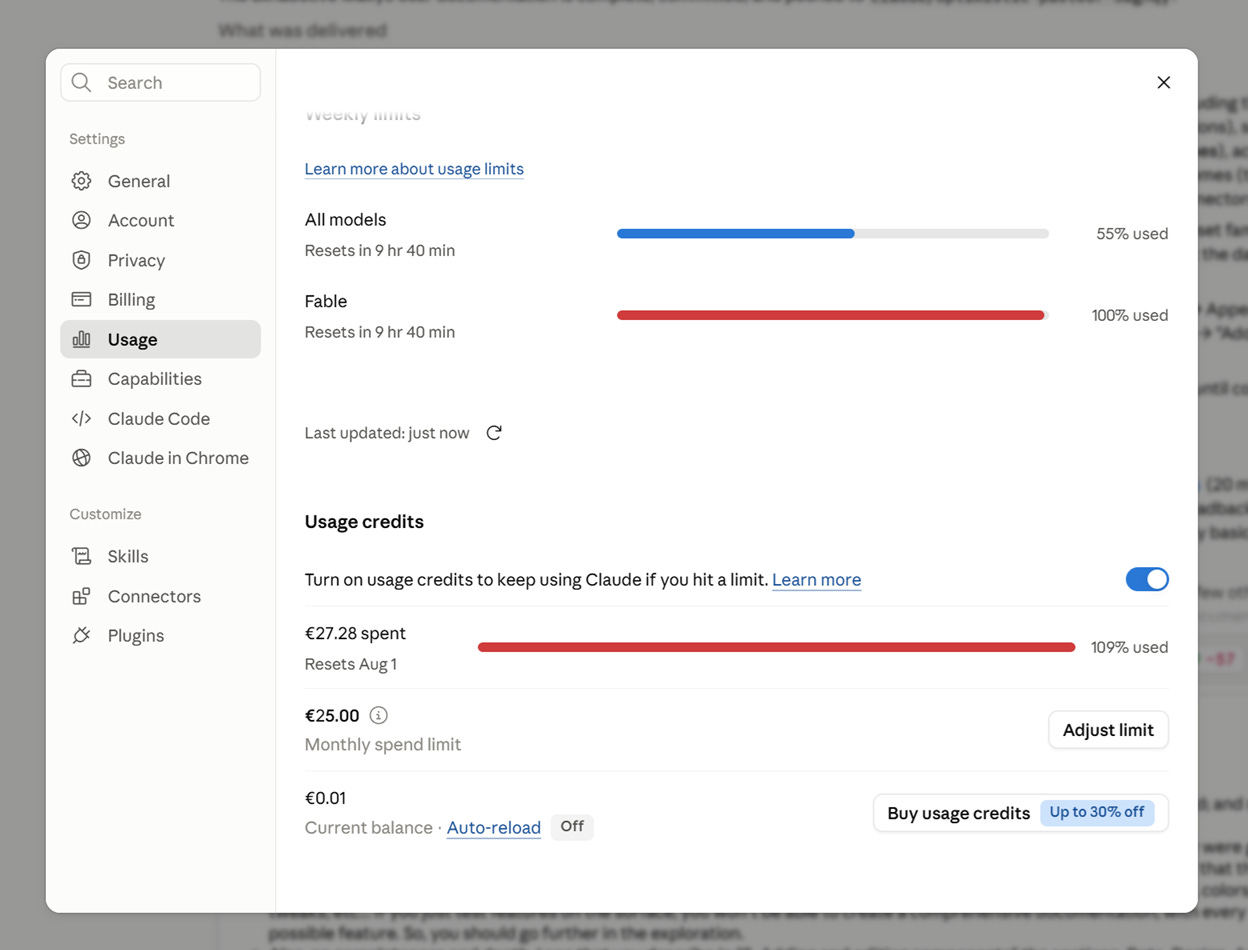
Usage credits are how you’ll be able to use Fable 5 after July 7, so they’re worth clarifying. In Settings, under Usage, you can prepay a balance that any surface can draw on (Chat, Cowork, Claude Code), billed at the same rates as Anthropic’s API.
Those rates are counted per token (the small chunks of text a model reads and writes), with one subtlety that explains most surprises: what the model reads (input tokens) and what it writes (output tokens) are priced differently. Output tokens cost five times more than input tokens, and the model’s internal reasoning counts as output.
This is also why agentic work costs so much more than simple question-answering: an agent reasons and writes at every step of a task, not once. Fable 5’s API rates are $10 per million tokens of input and $50 per million of output; in practice, running it as your everyday default wouldn’t be reasonable and could cost $1,000+ in usage credits every month. For power users, prepaid bundles include discounts ($50 of usage for $45, up to 30% off at $1,000).
I actually learned this the hard way. Plan limits run on a rolling five-hour window plus a weekly limit, and when usage credits are enabled, hitting the ceiling doesn’t stop the work: it switches to your credits. When working on a project two days ago, Fable 5 reached 100% of my 5-hour session and kept going; I noticed five minutes later, and it had already burnt more than €20 of credits. So one setting to check before you experiment: set a monthly spend cap when you enable credits, or keep credits off while working with Fable 5, which is good at many things, but also at burning through credits exceptionally efficiently…
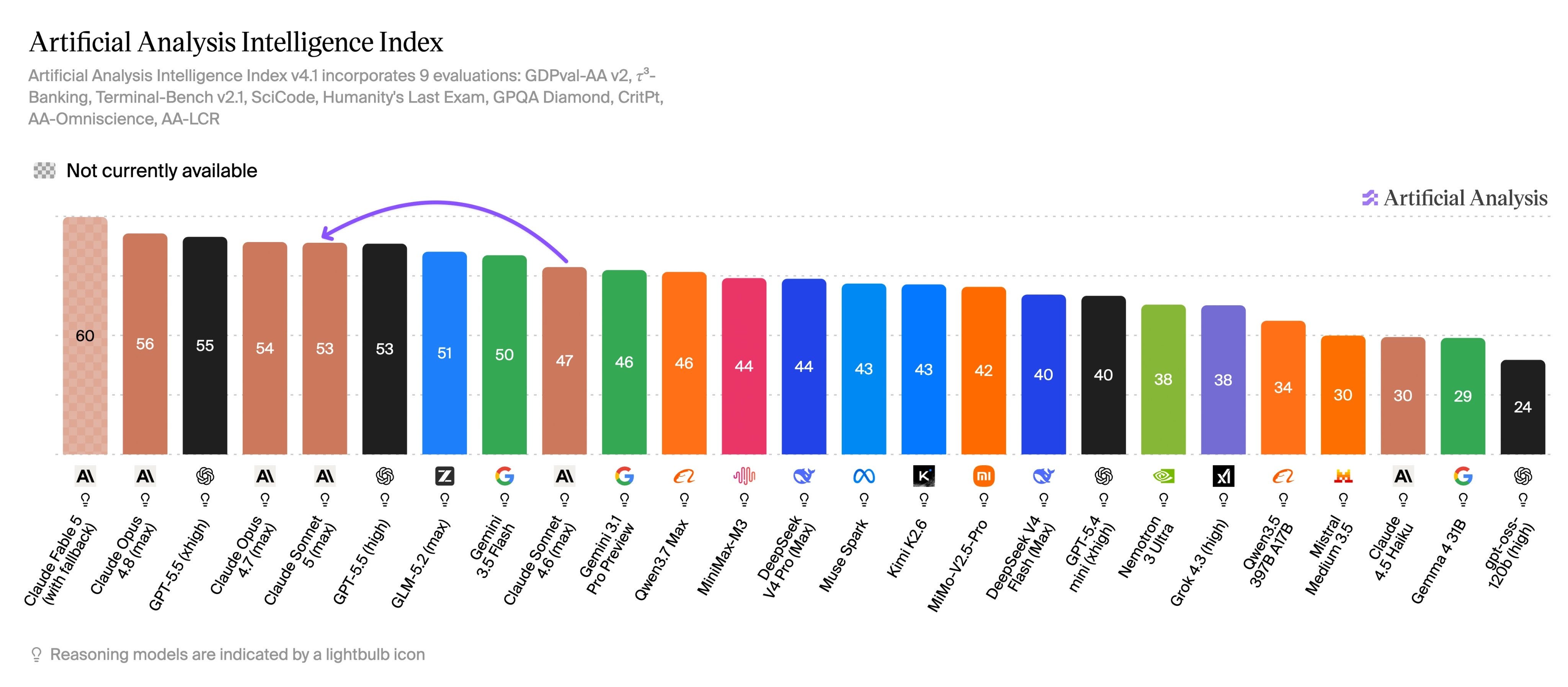
The same week saw another announcement from Anthropic: Sonnet 5, released June 30 and now the default on Free and Pro plans. Expectations were high (a 5 in the name suggested a big jump in capabilities), but reactions were mixed: the model landed on most benchmarks just below Opus 4.8. What changes, though, is the price for that level of capability: Sonnet 5 costs a fraction of Opus rates, and it’s included everywhere, even in the free plan.
Our working assumption at ElevAI is that this is the new normal: frontier models eventually don’t get included in the standard plans, and are priced per use instead. The official announcements don’t promise a return, so it’s a possibility we need to be ready for. That’s the hypothesis we take in the rest of this article: use frontier intelligence where it makes financial sense, and the right cheaper model everywhere else, so the next model release doesn’t catch you off guard.
Which model for which type of work
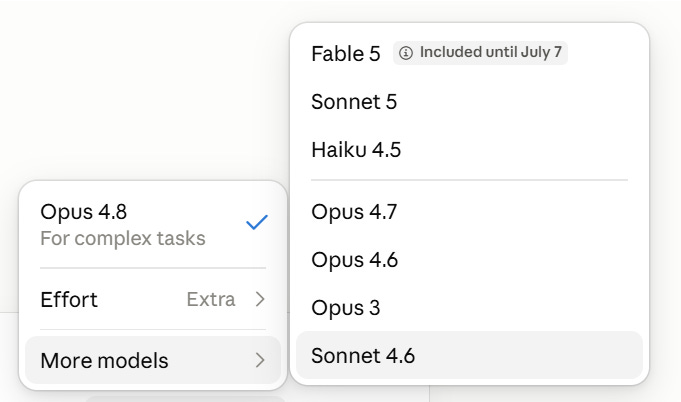
Anthropic’s model picker now lists eight models, five effort levels, and a thinking toggle; the choice has become crowded, and mixing up the roles is easy. Here’s the split we’ve settled on at ElevAI, and the reasoning behind each choice.
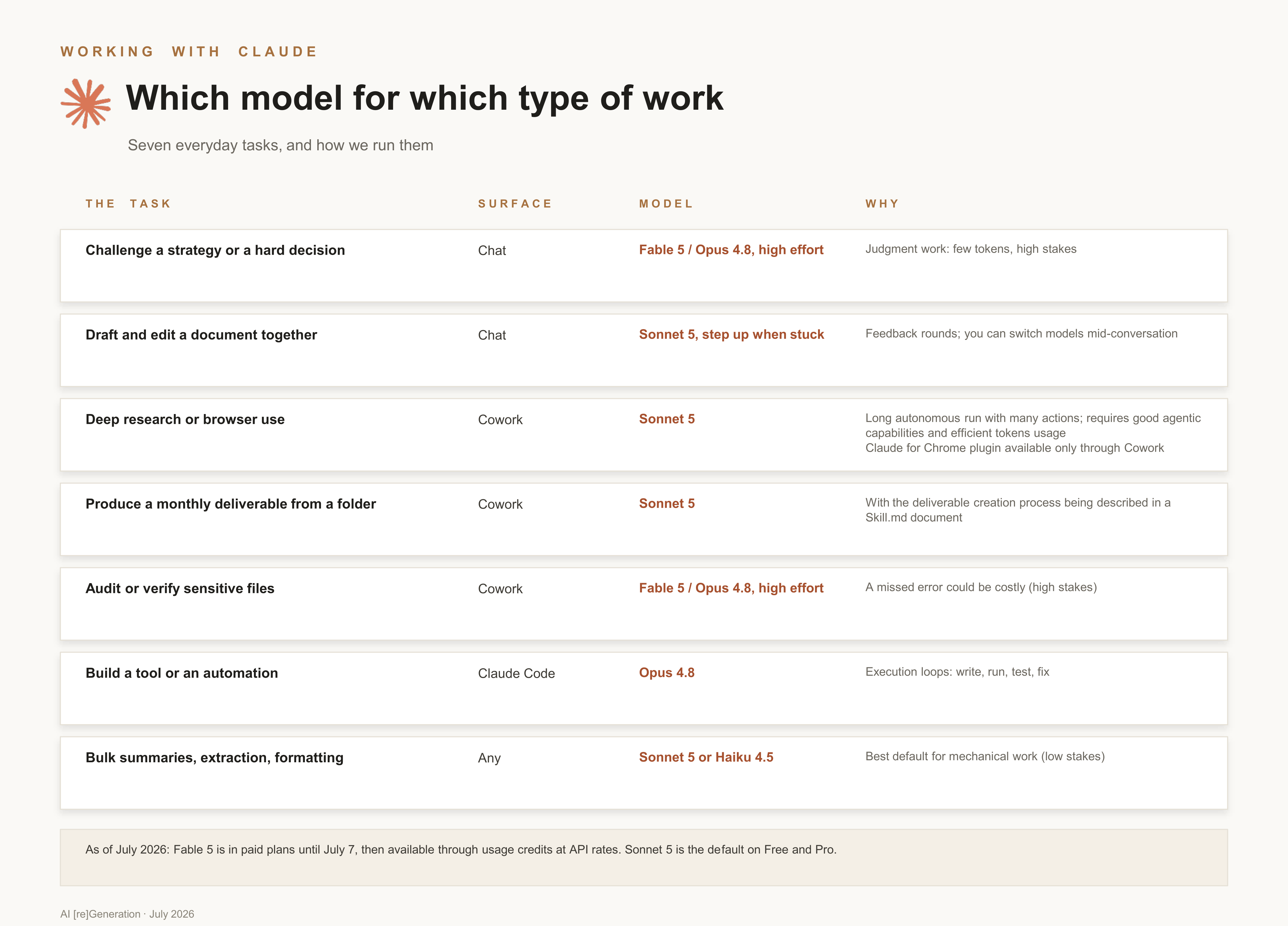
Fable 5: planning and decision-making. Framing a problem, choosing the approach, reviewing work at key milestones. On ordinary tasks its results are hard to tell apart from Opus 4.8’s at roughly double the cost; its edge shows on long, hard problems where judgment decides the outcome. Judgment work is small in tokens and large in consequences, which is exactly where a premium per token is worth paying.
Opus 4.8: complex execution. Multi-step tasks with real difficulty, and the model of choice for coding. It stays included in paid plans, so you can lean on it freely within your plan’s limits.
Sonnet 5: the default for most execution. Near-Opus quality on everyday work at a fraction of the cost, excellent at knowledge work (see the GDPval benchmark), and the app already starts you there.
Haiku 4.5: high-volume, simple tasks. Summaries in bulk, extraction, formatting, anything you’d run hundreds of times, and the low-stakes mechanical steps inside bigger workflows.
Note: none of these models generates images: Claude can produce charts, diagrams, and visual documents by using code, but for proper image generation you would need a different tool (such as GPT Image 2 from OpenAI, or Nano Banana 2 from Google).
Getting the most out of Fable 5
We spent the first days of the window running Fable 5 on real work, thoroughly enough to empty our allowance (thankfully, the limits were reset a few hours after the re-release). What we kept is a way of working: give Fable the decision-making, and give cheaper models the execution. Fable frames the task, writes the plan, and reviews the big milestones. Opus 4.8 or Sonnet 5 executes. Haiku 4.5 handles the mechanical, low-stakes volume. The app won’t do this split for you today, nothing routes work between models automatically, but with clear handoff messages and a bit of process, it works well.
Here’s what that looks like practically, in sequence. First, to Fable 5:
Here’s the goal and the context: [the goal, the constraints, the materials]. Don’t produce the deliverable yet. Produce three things instead: (1) a plan another model can execute, in numbered steps, each with a clear finish line; (2) the quality bar: what a good result looks like, and the two or three mistakes to avoid; (3) any questions you’d ask me before starting (interview me one question at a time about anything ambiguous).
Then to Sonnet 5, or Opus 4.8, for the execution:
Execute this plan: [paste the plan]. Hold the result to this quality bar: [paste the bar]. If a step can’t be completed as written, stop and tell me why instead of improvising.
And back to Fable 5 at a milestone, or when the project forks:
Here are the plan, the quality bar, and the work so far: [paste]. Review the work against the bar: what passes, what doesn’t, and what would you change in the plan before the next phase?
The tip that saves the most, before anything else: run Fable 5 on High effort, not Extra or Max. It stays remarkably capable while using far fewer tokens. After that, keep Fable sessions short and single-purpose: everything in a long conversation is re-read at every step, and billed as input tokens, so carry the state in the plan and the brief, and start fresh for each phase.
Anthropic seems to be converging on the same pattern. Its API now has an “advisor” feature in beta: a cheaper model does the work and consults a stronger model at the hard moments. It’s API-only for now, as far as we know, but it says something about where the tools are heading.
Through July 7, all of this can be practiced while Fable is still included. Use those limits first for the thorniest problems you’ve been putting off, or the projects where you’re stuck, and have the runs produce their results in formats you’ll reuse: a Word document for the brief, a Markdown file for the plan, an HTML page or PowerPoint template for the deliverable itself. Those are a goldmine, and they’ll keep their value even after Fable 5 is not as readily available.
A method for recurring tasks
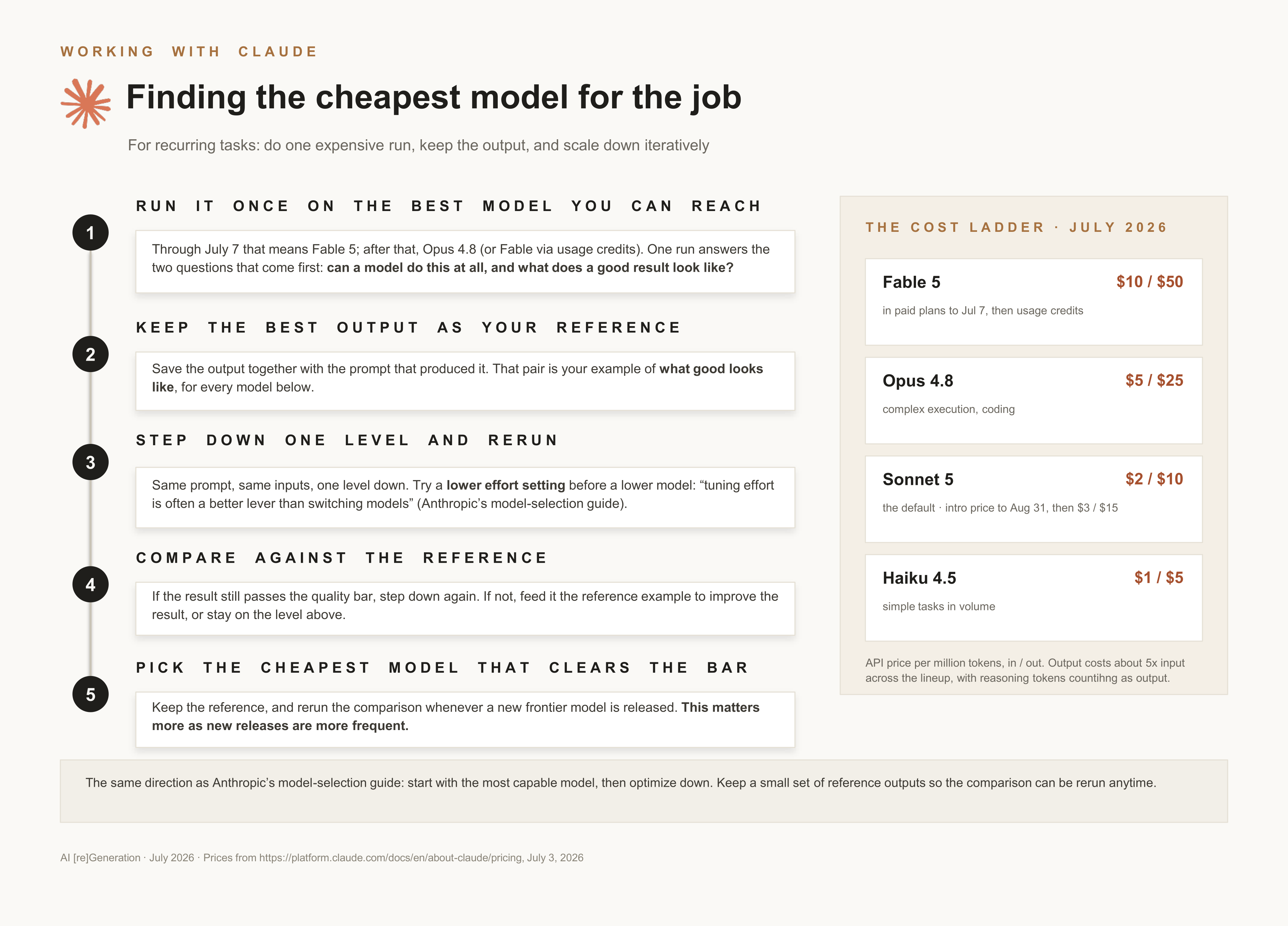
For recurring work, a weekly report, a monthly analysis, a standard deliverable, what we do is look for the cheapest model that does the job well. We first run the task on the best model available and keep the output: that becomes the reference for what good looks like.
Then we rerun the same task on the second-best model and compare. If the quality holds, the cheaper model gets the job; if it drops, we feed the reference example back in to lift the result. You can iterate this way down the lineup, and in a granular way, changing not only models but also effort settings within the same model. You end up zeroed in on the right level of capability for each task, and you produce useful reference assets along the way.
This is also Anthropic’s own recommended method (start with the most capable model, then optimize down), with one addition that pays off over time: keep the reference output and the prompt together, so you can rerun the comparison whenever a new model is available.
And if you never touch the model picker, then you’ve probably been on Sonnet 5 since June 30, which for most recurring work is the right place to start anyway.
Choosing a plan under the new rules
So which plan should you choose? The answer depends on how much of your week is dedicated to working with Claude.
A few sessions a week: Pro covers it well, and a small credit bundle can cover an occasional Fable run. At API rates, a few Fable tasks a week come to about $10 to $20 a month on top of the plan.
Part of your working day: Max 5x is the clear call. It allows heavy Opus 4.8 usage, which is what coding and knowledge work lean on, without watching limits all day.
Very intense workloads: Max 20x exists for power users, typically running parallel coding agents day and night. With Fable moving outside the plans, it’s fair to ask whether a premium subscription without the latest capabilities still makes sense for you, or whether Max 5x plus usage credits for the occasional frontier run is the better setup. For many people, it now is.
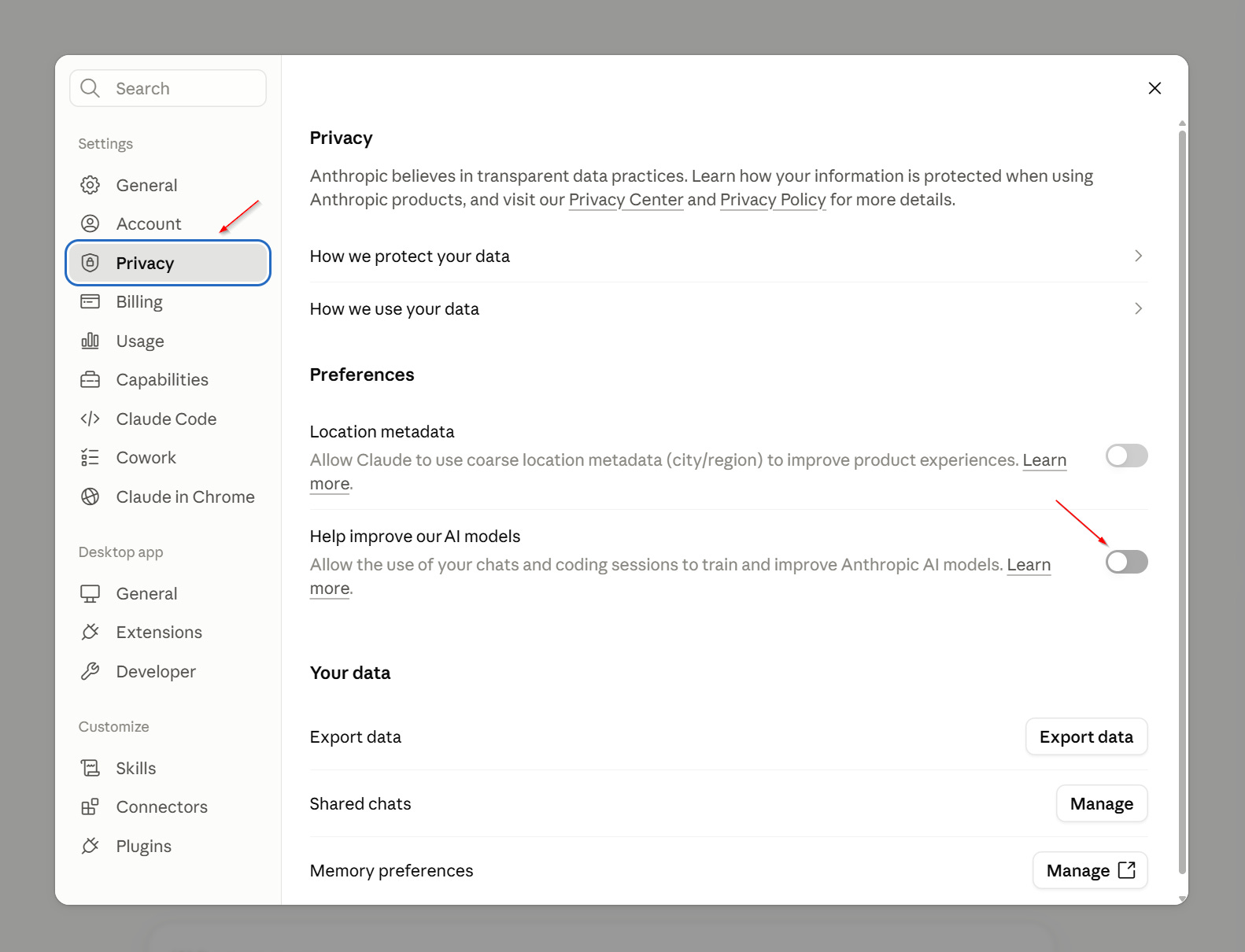
A note on privacy for the new Mythos-class models: Fable 5 conversations are retained for 30 days, even if you’ve disabled sharing your data for model training (the toggle under Privacy). The retention is part of the tighter safeguards on this class of models.
How we apply this at ElevAI
For the curious, here’s a glimpse of how we use Claude day to day at ElevAI.
The chat app is where thinking happens: strategy sessions, helping with writing (this series included), deep research. We default to Sonnet 5 for most tasks, and we switch mid-conversation to Opus 4.8 and bump up the reasoning effort to “Extra” for complex tasks or when a high quality output is expected.
Tip: we’ve noticed that using the “Max” instead of “Extra” didn’t yield better results, and in some cases even made it worse. A possible explanation is that the model is “overthinking”, which might reduce the quality of the output and cost more.
Cowork is where we hand over whole pieces of work: recurring deliverables produced from folders of source files, generally using a SKILL.md file to describe the process. Cowork is also really good for tasks that require taking actions within a browser. It pairs especially well with the Claude for Chrome extension. We use this extensively for anything that needs to use Chrome, such as navigating a website and taking screenshots, or QA-testing real apps.
There is one important detail that influences how we choose the surface: Cowork keeps the model and effort level you pick at launch for the whole conversation. So we choose deliberately before starting: Sonnet 5 for pure production or the strongest model available when the task is strategic or planning in nature.
Claude Code is where we build (used in the desktop app or from the web app): internal tools and client automations, mostly on Opus 4.8 at High or Extra effort, depending on how extensive the context is. We rarely use Haiku 4.5, except when we are faced with a very high volume task where cost and speed are the determining factors.
We also make sure we regularly create handoff briefs for every important conversation (see the prompt in Part 1), saved as a dated file next to the work itself; after a few months, that stack of briefs becomes the project’s memory and makes it easy to restart clean conversations with different model or effort settings.
As for the plan: we’re using a mix of Pro and Max 5x plans, depending on the usage intensity, with usage credits enabled as a safety net and capped monthly.
What’s next
That was a lot in one article; if you’ve read this far, you’re now better equipped than most Claude users to choose your models and your plan.
If you keep one thing from all this, keep this: before a task that matters, pause and ask what model, and how much effort, it calls for. We believe this habit will become an important skill.
If you have a Claude subscription, there is one more thing to do before July 7, if you can: pick the hardest problem on your plate and run it through Fable 5 while the plan still includes it. At worst you’ll get a strong result. More likely, you’ll also get a better sense of when a paid Fable run will be worth it later.
Part 3 will cover Claude Cowork, our go-to surface for handing over entire pieces of work: we’ll show you real tasks, step by step, our best tips, including the prompts.

In the meantime, one question for the comments: what does your everyday Claude setup look like? What tool do you open first? Which model is your default? Any tip you’d like to share with the other readers?